
A kitchen retailer's supplier order tracking, family by family.
Know, for each file, what is ordered, confirmed and received, by supplier. Acknowledgements, dates and delays in one place, with an alert before goods arrive too late for the installation.
Five families, a clear status for each.
Units, appliances, worktop, sanitaryware, accessories: each family goes from "to order" to "ordered", then "received", with one colour per step. A salesperson who has just entered a file sees no red alert: red is reserved for real delays.

Each step leaves a trace, with no re-entry.
1. Order placed
One box per family records that the order has been placed, without waiting for the acknowledgement. The file moves to the "Ordered" status.
2. Confirmations
One acknowledgement number and one delivery date for all of a supplier's items, in a single gesture.
3. Receipt
Each item is dated on arrival. A backorder stays tracked without blocking the rest of the file.
Be warned before the delay, not after.
Frequently asked questions
Which product families are tracked?
Units, appliances, worktop, sanitaryware and accessories. A family with no items is marked "not concerned", which avoids blocking a file for nothing.
Does the "Order placed" box send the order to the supplier?
No. The order is placed in your design software or with the supplier; the box records in KitchenSync that it has been done, without waiting for the acknowledgement.
How are supplier confirmations entered?
Supplier by supplier: a single acknowledgement number and expected delivery date for all the items concerned, with the option to untick those that arrive under another number. Actual receipt is dated item by item.
How are you warned of a delay before the installation?
An item whose planned date has passed without receipt is raised as an alert, grouped by family, on the dashboard. An alert also flags a kitchen that has not been ordered as the installation approaches.
Can planned and confirmed be compared by supplier?
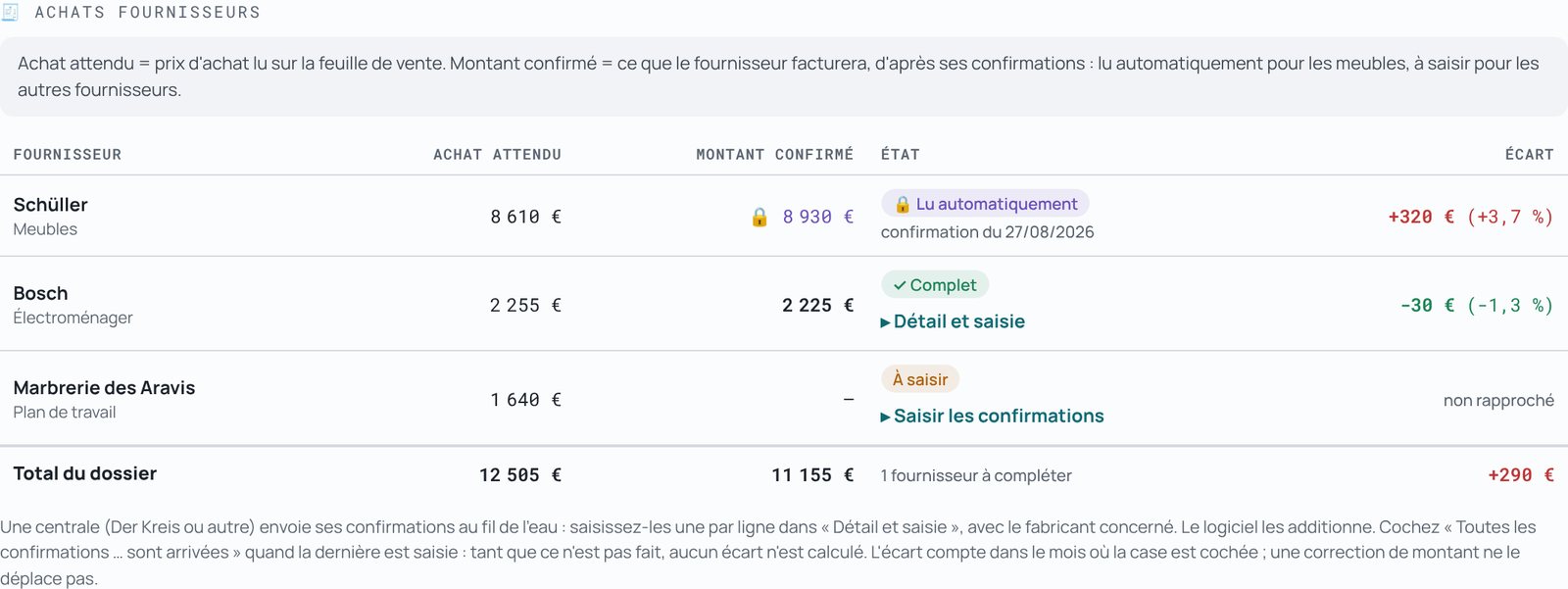
Yes, for Management: the purchase amount planned on the sales sheet is compared with what the supplier confirmed, with the variance by supplier, by month and since January. For units, the manufacturer's confirmation is read automatically.
See also: the fitters' schedule, the features, pricing.